A Messenger App with a Crypto Wallet: What Features Make Sends Messenger Special
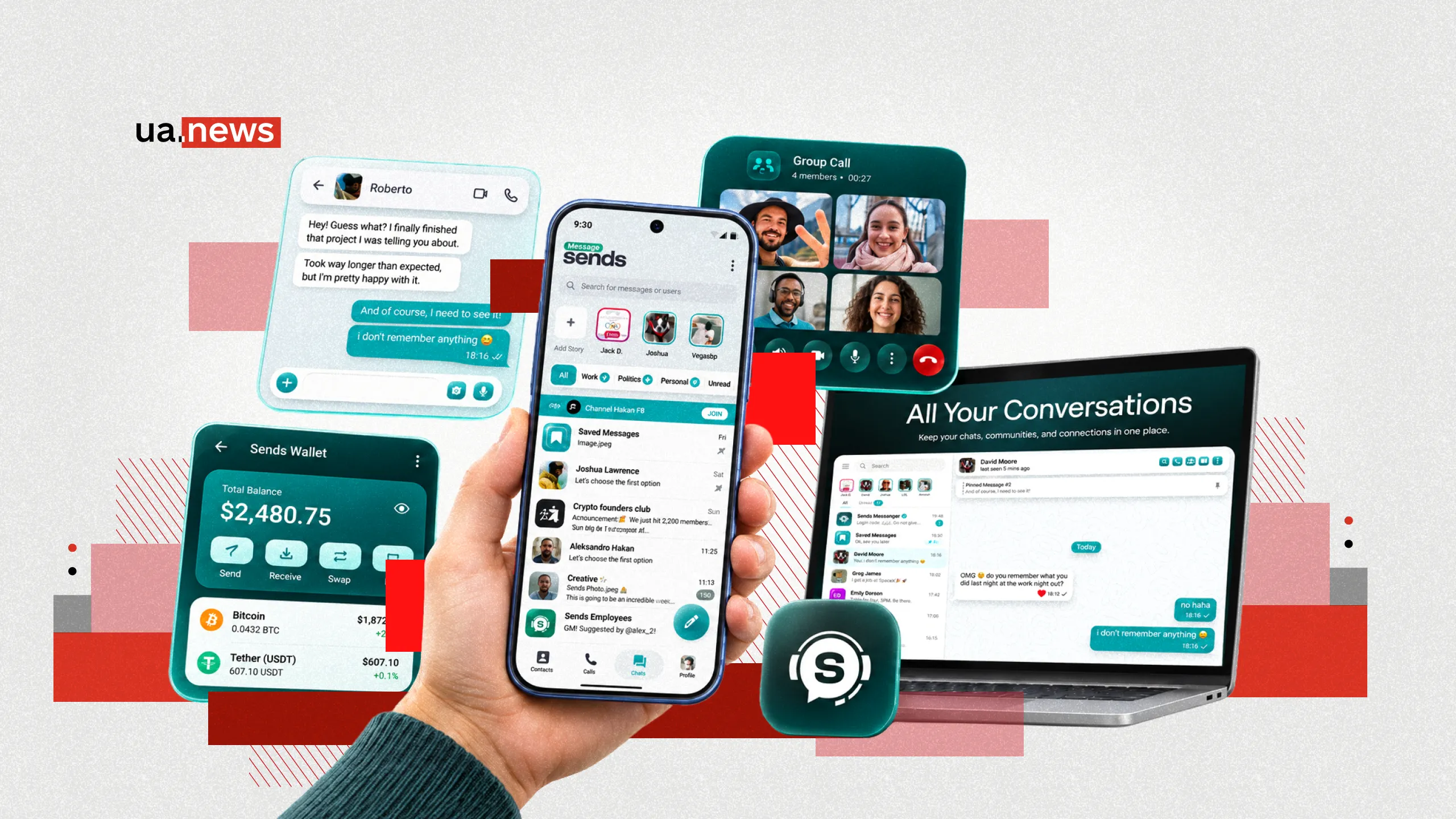
Modern messaging apps are gradually moving beyond simple messaging. Users expect them to offer not only fast messaging and calls, but also the ability to work with documents, protect personal information, and use additional digital services.
One of the apps evolving in this direction is Sends Messenger. It combines one-on-one and group chats, audio and video calls, file sharing, privacy tools, and a built-in crypto wallet.
Throughout 2026, Sends Messenger received a series of updates. These included a redesigned interface, enhancements to group calls, and improvements to its cryptocurrency tools.
UA.News explains what features Sends Messenger offers, how its data protection tools work, what changes were made to the app in 2026, and how it can be useful in everyday life.
One app for various tasks: how to use Sends Messenger
Today’s users are increasingly combining personal communication, work-related matters, and everyday tasks in the digital environment. To do this, they often have to use several different apps: one for messaging, another for video calls, and a third for sharing documents or conducting financial transactions.
Sends Messenger offers to combine some of these features into a single app. Its functionality encompasses not only messaging and calls but also tools for data protection, organizing group communication, and managing digital assets.
For example, for personal conversations, you can use regular chats to send photos, videos, and voice messages. If you need to discuss a confidential matter, secret chats with end-to-end encryption and an auto-delete feature are available.
For work or study, the app offers group chats, video calls, and document sharing. Users can discuss joint tasks, exchange materials, and stay in touch with colleagues or classmates.
Certain features come in handy for international communication. In particular, the message translation feature helps you carry on conversations with people who speak other languages.
For those who work with cryptocurrencies, Sends Messenger also offers a built-in crypto wallet. It allows you to combine communication with digital asset transactions without having to constantly switch between different apps.
Thus, Sends Messenger can be used for a variety of everyday tasks—from sending quick messages to loved ones to organizing group chats and making cryptocurrency transfers. Users can choose for themselves exactly which features they need.
How Sends Messenger Protects Private Conversations

Privacy remains one of the key considerations when choosing a messaging app. People use these apps to share personal photos, work documents, addresses, financial information, and other materials that should not be accessible to third parties.
Sends Messenger uses several mechanisms to protect information. An important feature is the separation of regular cloud-based chats and secret messaging.
Cloud chats are designed for everyday communication. Messages, photos, videos, and documents are stored in encrypted form on the service’s servers, allowing users to access their chat history from various devices.
Another format is secret chats with end-to-end encryption. In this case, messages are encrypted on the sender’s device and decrypted on the recipient’s device.
According to Sends Messenger’s privacy policy, the keys for decrypting secret chats are available only to the participants in the conversation, and the chat history itself is not stored in the messenger’s standard cloud infrastructure.
A separate mechanism is provided for media files. Before being uploaded, photos, videos, and other media sent in a secret chat are encrypted with individual keys.
Thus, cloud-based and secret chats serve different purposes. The former provide convenient access to conversation history, while the latter are designed for enhanced privacy.
Disappearing Messages in Sends Messenger: How to Manage Your Chat History
Not all messages need to be stored for a long time. Brief agreements, temporary addresses, and personal discussions may become irrelevant within just a few hours.
For such situations, Sends Messenger offers disappearing messages. In secret chats, users can set a timer; once the timer expires, messages will be automatically deleted from the participants’ devices.
The countdown begins once the message is read. This feature also applies to photos and videos, for which a corresponding retention period is set.
In addition, Sends Messenger supports editing and deleting sent messages. For example, if a user makes a mistake in a meeting date or address, they can correct the text without having to send multiple clarifications.
Chat archiving is also available to help organize your conversations. You can remove less relevant conversations from the main list without deleting their history.
PIN, screen lock, and additional security settings in Sends Messenger

Even encryption doesn’t eliminate all privacy risks. Some information may accidentally appear on a smartphone screen, and other people sometimes gain access to the device.
Sends Messenger offers additional tools to protect your account. One of them is a PIN code, which can be used as an extra layer of profile security.
Another feature is Screen Security. It helps hide the app’s content when viewing the list of open apps.
For example, if a user was using the messenger and then switched to a browser or email, the app’s preview may not show the content of the most recent conversation.
Additionally, Sends Messenger includes verification of cryptographic security codes for secure communication.
At the same time, it’s important for users to remember the basic rules of digital security: set a lock screen on their smartphone, update apps regularly, and never share authorization codes with third parties.
Group Video Calls, Channels, and Communities in Sends Messenger
Sends Messenger can be used not only for one-on-one messaging but also for communication among several people.
The app supports group chats, audio and video calls, and the sharing of documents and media files. This allows you to use a single service for a variety of situations—from family conversations to discussing joint projects. During a conversation with multiple participants on a mobile device, you can switch between different display modes. Specifically, you can choose a grid view of participants or a mode that focuses on the person currently speaking.
Users can also control the camera, microphone, and audio playback devices—for example, switching between headphones and the smartphone’s speaker.
Additionally, Sends Messenger supports public channels and communities. Group chats can be used to discuss shared topics, while channels are suitable for disseminating information to a wider audience.
Thanks to this, the app can serve not only as a personal messenger but also as a tool for organizing themed communities.
From documents to custom stickers: everyday communication features in Sends Messenger
In addition to secure messaging, Sends Messenger offers a range of features that users have come to expect from modern messaging apps. The app allows you to send text and voice messages, photos, videos, and documents. Short video messages are also available.
For example, participants in a group chat can discuss a document, send photos, clarify details via voice messages, and, if necessary, set up a call.
The developers have placed special emphasis on personalization. Sends Messenger supports GIFs and stickers, including the ability to create your own sets.
Users can also customize the appearance of their chats. They can change themes, wallpapers, and individual interface elements to suit their preferences.
How Sends Messenger Helps You Communicate in Different Languages

Another area of development for Sends Messenger is tools that simplify communication between people from different countries. The messenger includes the ability to translate text messages. This feature was added to the app back in 2025 and remains part of its additional capabilities.
Users can select a message and use the translation feature after enabling the relevant settings.
Sends Messenger’s privacy policy also describes the ability to automatically translate conversations in chats, groups, and channels. Such tools can be useful for people who work with international colleagues, maintain international contacts, or regularly communicate in multiple languages.
The service’s documentation also specifically describes the conversion of voice and video messages to text for those messages where this feature is available. This can be helpful when it’s not possible to listen to a voice message.
At the same time, the use of translation and speech recognition has specific implications regarding privacy. According to Sends Messenger’s policy, the service may use Google technologies to process such requests, transmitting the corresponding text or audio material.
How the Sends Messenger Crypto Wallet Works

One of the unique features of Sends Messenger is its combination of standard messaging with tools for managing digital assets.
The app features a built-in crypto wallet that allows users to store, send, and receive cryptocurrency.
A non-custodial wallet means that the user independently controls their private keys or other means of accessing their funds, rather than handing over control to a centralized operator. In the case of Sends Messenger, this approach allows users to utilize financial tools directly within the messenger environment.
Possible use cases include transfers between users, receiving cryptocurrency, and paying for digital goods and certain services. For example, two users can agree on a transfer while chatting and then use the built-in wallet without having to switch to a separate cryptocurrency app.
However, the non-custodial model also entails additional responsibility. If private keys or a recovery phrase are lost, the user may lose access to their funds. It is also necessary to consider potential network fees, the risk of fraud, and the irreversibility of many blockchain transactions.
Therefore, before conducting transactions, it is important to verify the recipient’s address, the transfer terms, and the rules for storing data needed to recover the wallet.
The built-in crypto wallet is not a mandatory feature for all Sends Messenger users. However, it expands the app’s capabilities for those who want to combine communication and work with digital assets.
Virtual Numbers and Additional Digital Services in Sends Messenger
The development of Sends Messenger isn’t limited to messaging and cryptocurrencies. The app also enhances registration capabilities and personal data protection through integration with the eSends digital platform.
One such solution is eSends’ Web3 numbers, which allow users to create accounts without using a personal phone number or a physical SIM card. Unlike traditional mobile numbers, Web3 numbers exist as digital assets on the TON blockchain and are controlled by the crypto wallet owner.
To register with Sends Messenger, a user can choose to log in via eSends, enter their Web3 number, and request a verification code. The code is sent to the corresponding crypto wallet, after which it must be entered in the messenger to complete registration.
This approach allows users to keep their primary phone number private when creating an account. Additionally, since a Web3 number is a digital asset, it can be transferred to another owner.
How Sends Messenger Supports Bots and Communication Automation

In addition to regular messaging, Sends Messenger supports the use of bots—special programs that help automate certain actions and interact with users.
As stated in Sends Messenger’s official privacy policy, the platform has an API that allows third-party developers to create their own bots and integrate them into the messenger.
Users can interact with these programs in private chats, add them to groups, or use a special built-in interface for inline bots. The latter allows users to access the bot’s functions directly while composing a message.
Such tools can be used for automated responses, information searches, executing simple commands, and other tasks that do not require constant human involvement. Specific capabilities depend on the functionality of the individual bot.
At the same time, Sends Messenger distinguishes between its own services and applications from independent developers. When interacting with a third-party bot, messages, commands, and certain user profile data may be shared with it.
In group chats, a bot’s access to messages depends on its settings. Therefore, before using such tools, it’s important to pay attention to their developer and the amount of information they can access.
Why Sends Messenger Is Convenient for Working Across Multiple Devices
These days, people often start a conversation on their smartphone and continue it on their computer. This is especially true for those who work with documents, photos, and large amounts of text.
Sends Messenger supports mobile apps for Android and iOS, as well as desktop versions for Windows and macOS.
Thanks to cloud-based message storage, users can access their chat history from different devices.
For example, a document received on a smartphone can be opened while working on a computer. Similarly, you can continue a conversation or view materials sent earlier.
At the same time, secret chats use a different storage model. They are tied to specific devices and are not synced via the cloud in the same way as regular conversations.
To organize your personal information, Sends Messenger also includes notes for yourself. You can use this tool to save links, documents, short notes, or materials you want to come back to later.
What Personal Data Does Sends Messenger Use?

How Sends Messenger handles personal information deserves special attention. According to the service’s privacy policy, the company states that it does not use personal data for targeted advertising.
At the same time, certain user information is required for the app to function, including a phone number, account details, and other information related to the use of the service.
Synchronization of the phone book occurs with the user’s consent. The privacy settings allow users to disable synchronization and delete the corresponding contacts from the servers.
To prevent fraud, spam, and other violations, the service may also process technical information, including IP addresses, device information, and the history of username changes.
The privacy policy allows for the storage of certain metadata for up to 12 months. Users can delete their accounts and the associated data stored in the messenger’s cloud infrastructure.
Another mechanism is the automatic deletion of inactive accounts.
By default, the service’s policy specifies a six-month period of inactivity, after which the account and associated data may be deleted. Users can change this timeframe in their settings.
How to Get Started with Sends Messenger
Sends Messenger is designed for a variety of use cases. For some users, the main features will be regular messaging and video calls. Others may be interested in secret chats, group messaging, message translation, or the built-in crypto wallet.
You can start exploring the app with standard messaging. After signing up, you can set up your profile, customize chat themes, and adjust privacy settings.
Next, you can try group chats, file sharing, calls, personal notes, and other tools.
Sends Messenger continues to evolve as a multifunctional communication platform, combining the familiar features of a messenger with data protection and additional digital services.
You can download Sends Messenger for Android on Google Play and for iPhone on the App Store.